


Skip to content
Softcoderz
Illustrative sample

Delivery

Hyperlocal grocery delivery platform

Customer, store and delivery partner apps plus an admin dashboard for stores delivering within a few kilometres.

Not client work. This sample shows how we would scope and build this type of product. Names and figures in any previews are invented.

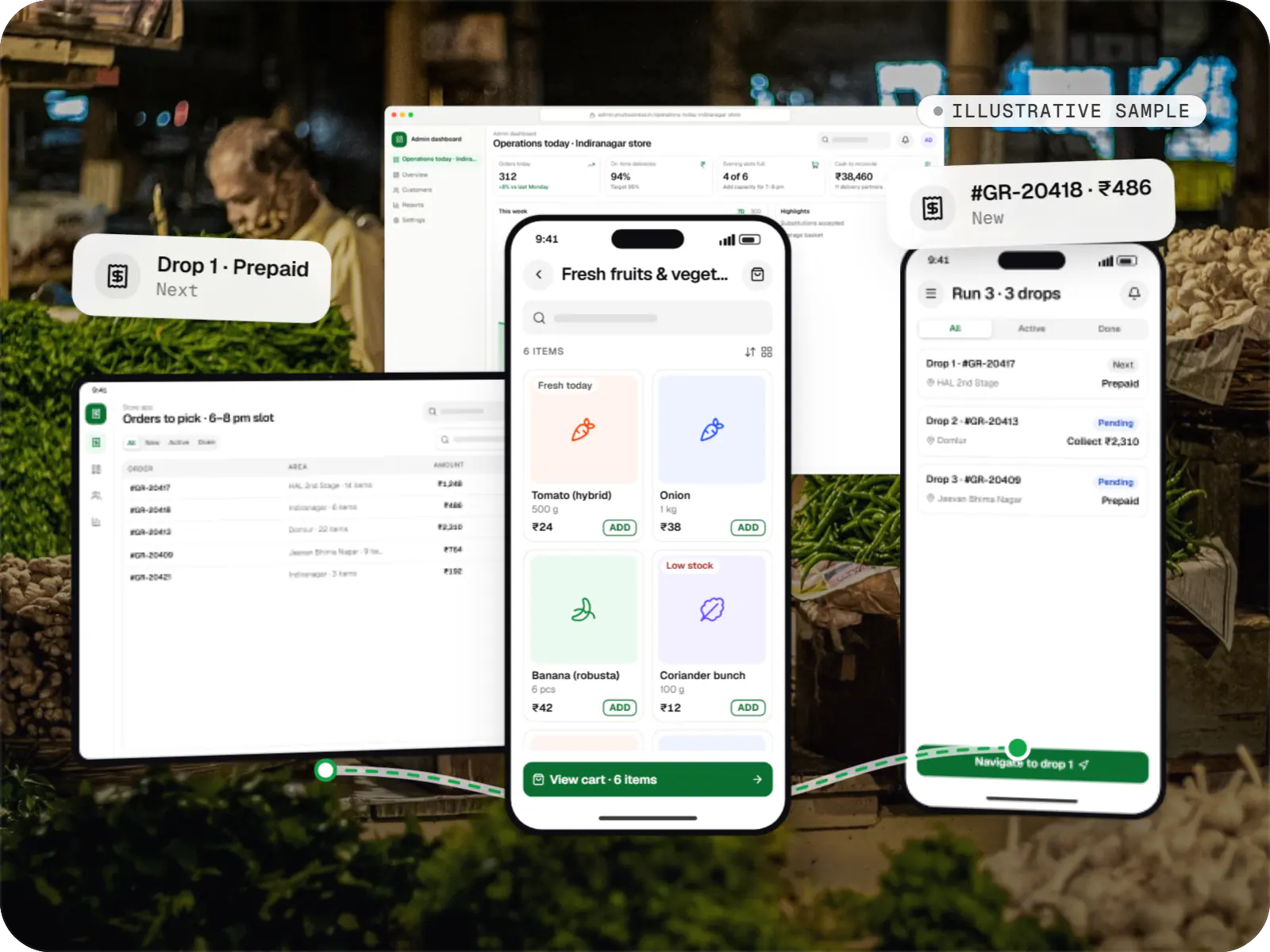
Sample hyperlocal grocery delivery platform: customer, store and delivery partner apps over a photo of a fresh produce market
Illustrative sampleOne order moving from the customer app to the store and on to the delivery partner.

Overview

About this sample

This sample project shows how we would approach a hyperlocal grocery platform for a small chain of neighbourhood stores in one city. It is not client work: names and figures in the previews are invented, but the flows and effort ranges reflect how we plan real grocery builds.

Project facts

Illustrative sample
Status
Illustrative sample, not client work
Project type
Mobile + web platform
Runs on
  • Android app
  • iOS app
  • Cross-platform mobile app
  • Admin dashboard
Built for
  • Customers
  • Store staff
  • Delivery partners
  • Operations team
Typical timeline
Typical build: 14โ€“18 weeks for a first release in one city

Flutter and the related logo are trademarks of Google LLC. We are not endorsed by or affiliated with Google LLC.

Product preview

The apps your customers, store staff and delivery partners use

Illustrative screens from each app in the platform. Products, prices and figures are invented.

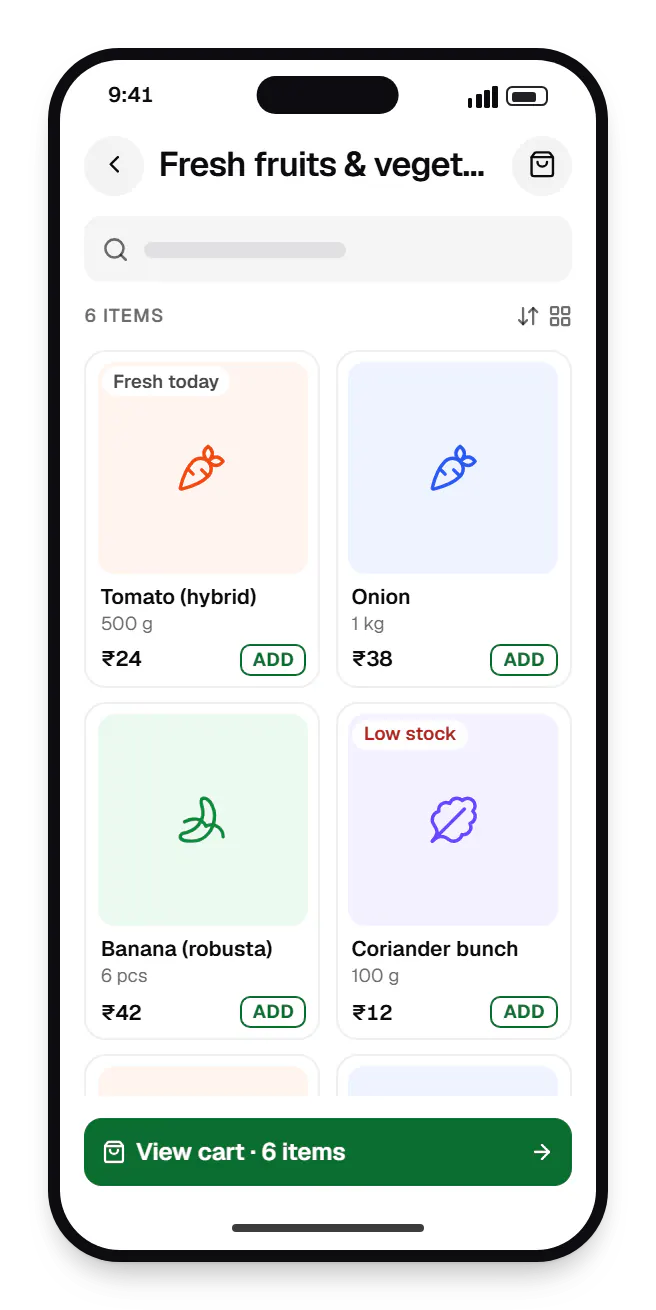
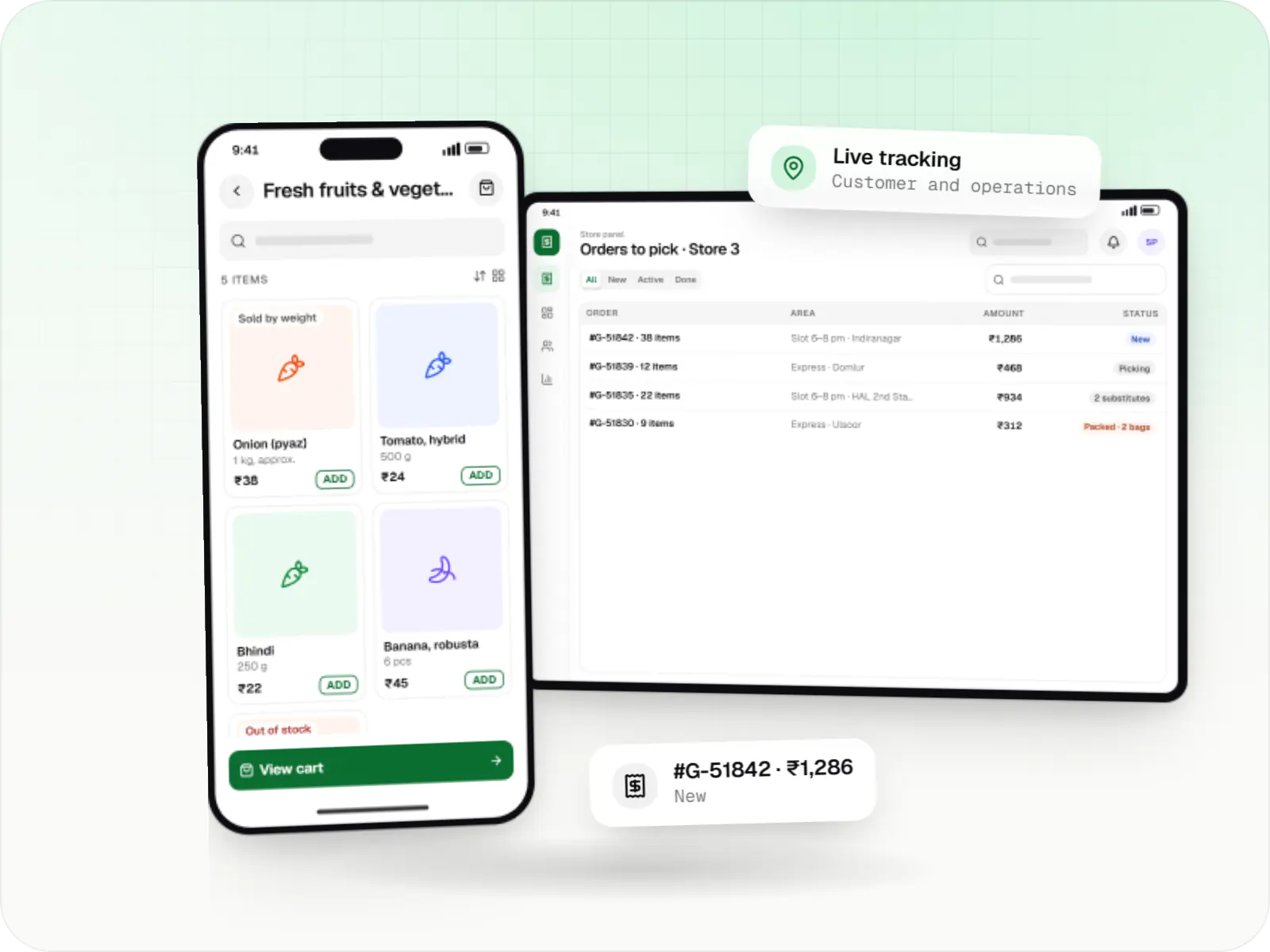
  • Hyperlocal grocery delivery platform customer app catalogue on a phone, showing fresh fruits and vegetables with prices
    Customer app. Customers see only what their nearest store has in stock, with weight and pack-size options, and add items in one tap.
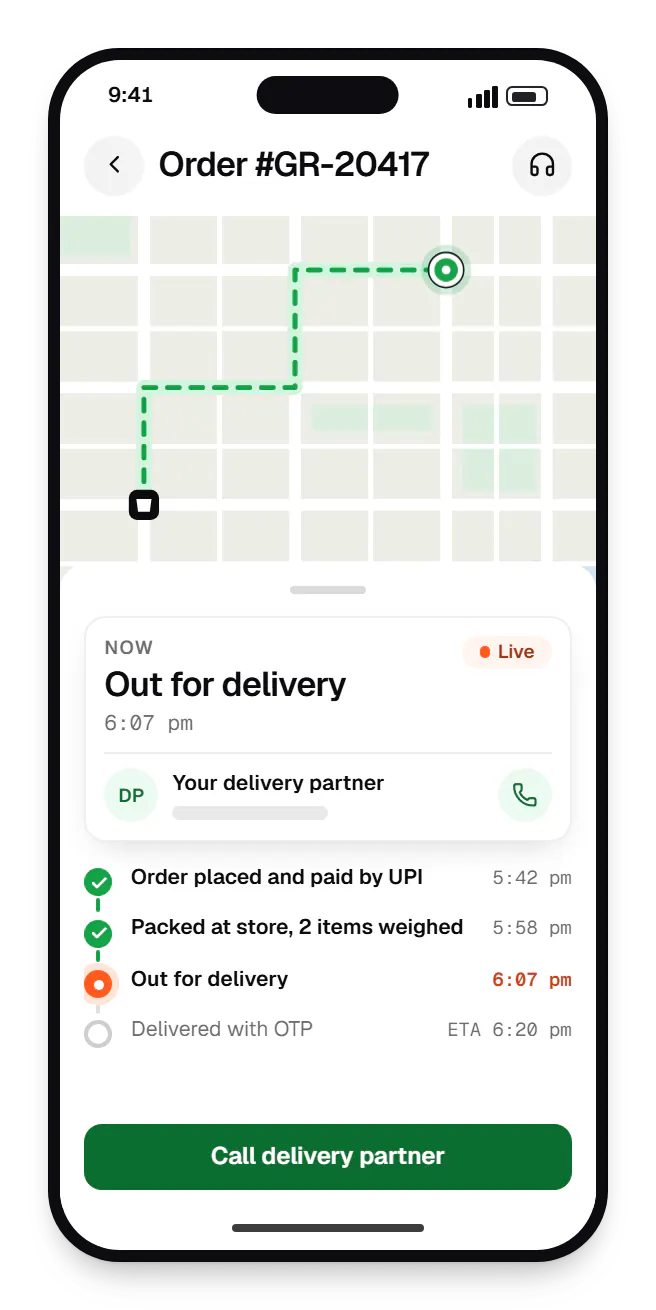
  • Hyperlocal grocery delivery platform customer app order tracking on a phone, with live status steps
    Customer app. Customers follow each stage of the order and the delivery partner's live position, which cuts down 'where is my order?' calls to the store.
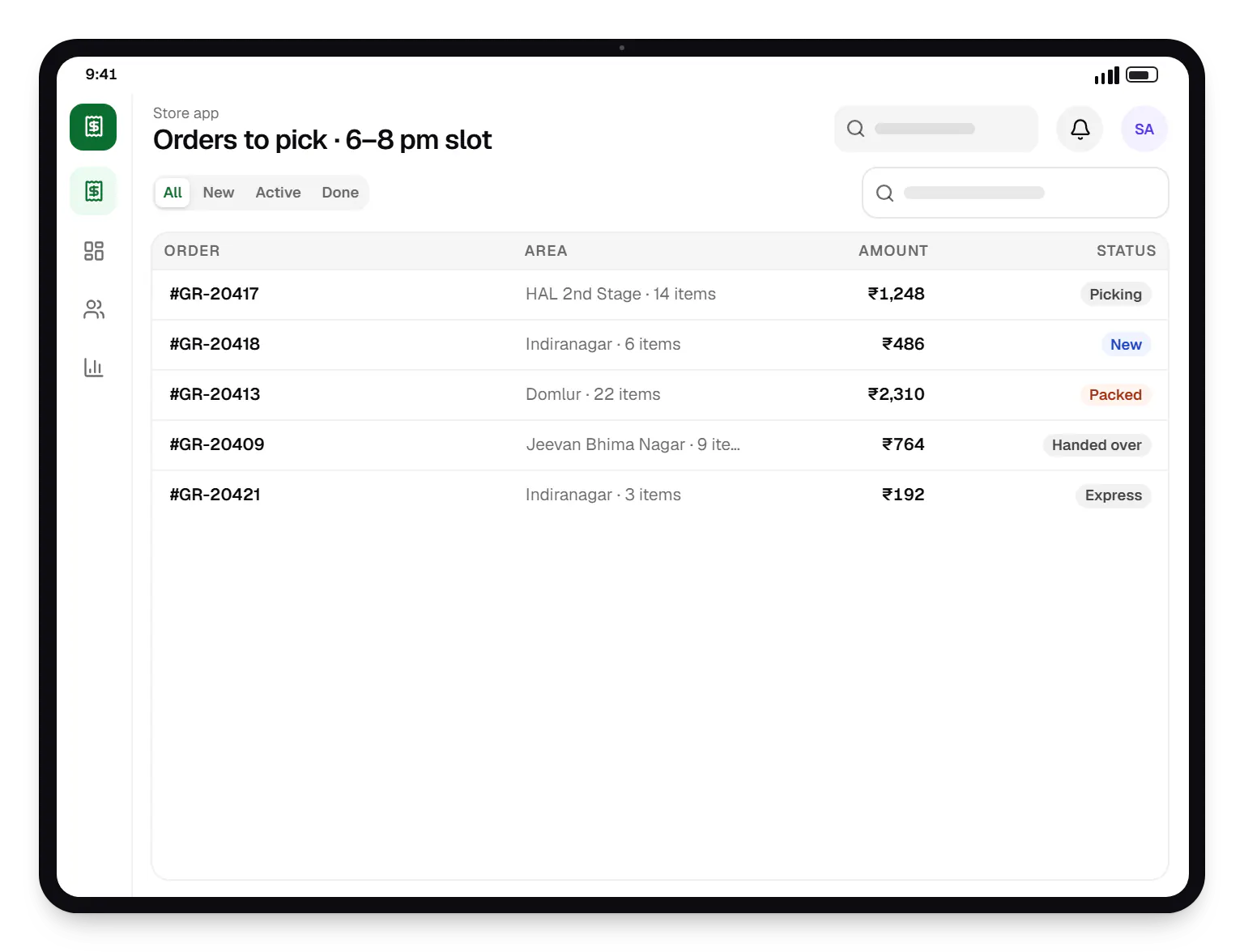
  • Hyperlocal grocery delivery platform store app order list on a tablet, with 5 orders and their status
    Store app. Store staff see incoming orders by slot, pick them aisle by aisle and flag substitutions before handing over to a delivery partner.
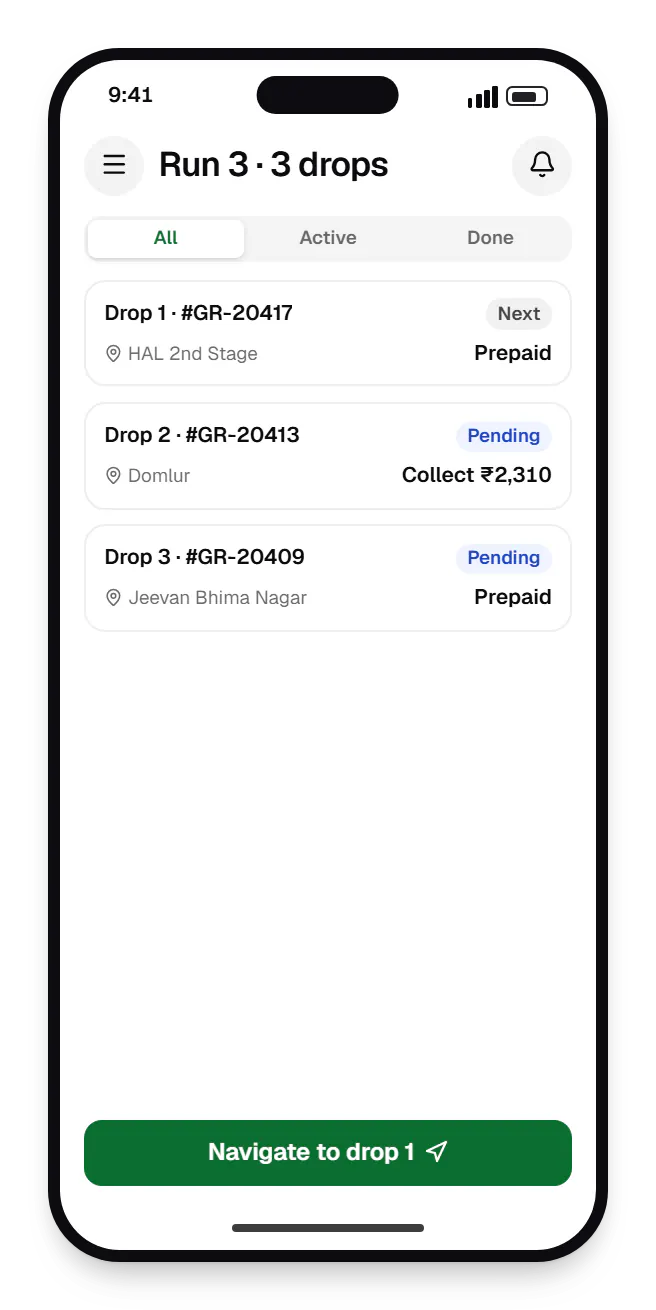
  • Hyperlocal grocery platform delivery partner app order list on a phone, with 3 orders and their status
    Delivery partner app. Delivery partners get a batched run with the drop order, one-tap navigation and the exact cash to collect on cash-on-delivery orders.
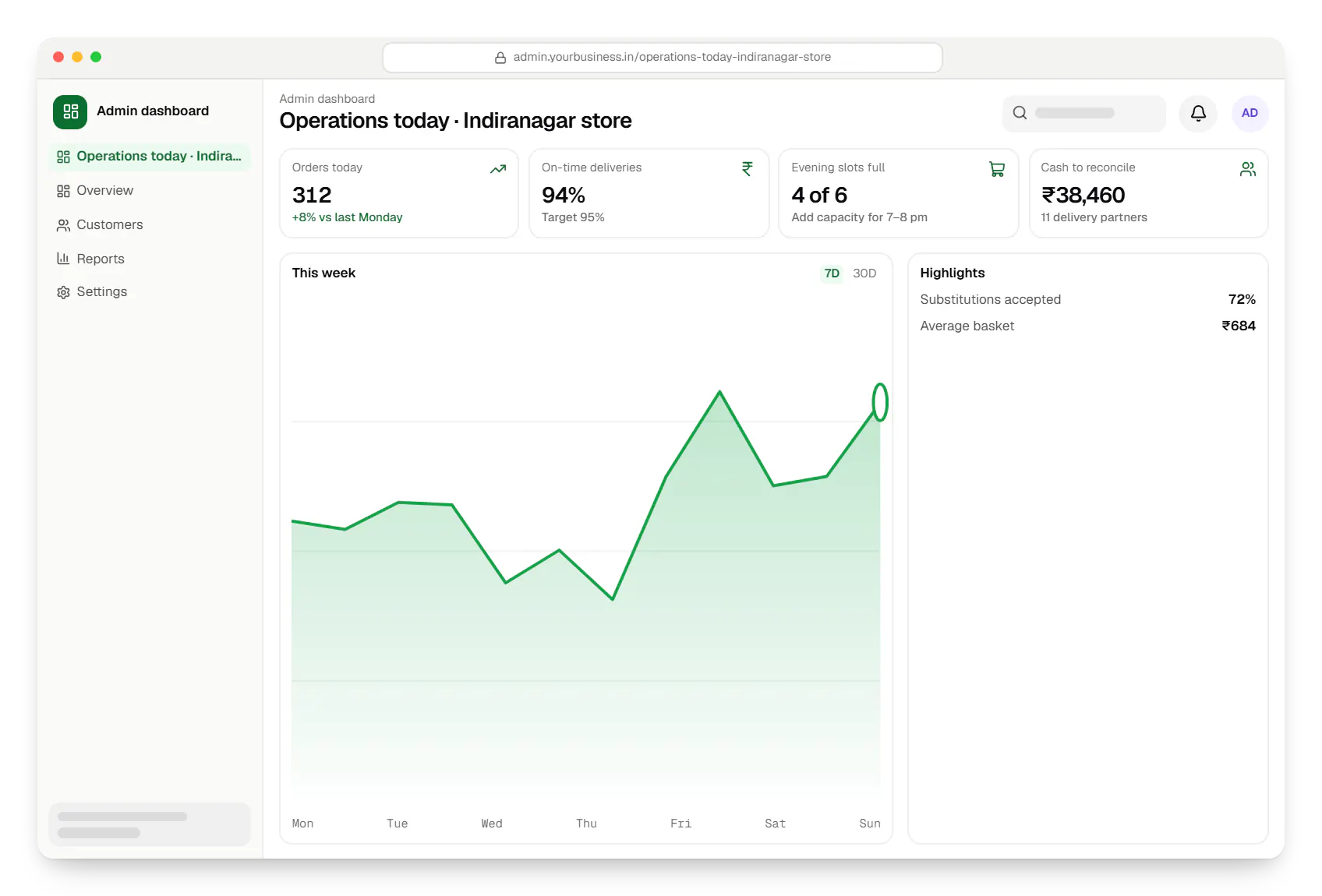
  • Hyperlocal grocery delivery platform admin dashboard in a web browser, with key figures and a chart
    Admin dashboard. The operations team watches orders, slot capacity, substitutions and cash on delivery across stores, and can act before customers are affected.
Illustrative preview

Sample screens: names, prices and figures are examples, not client data.

How it works

How a grocery order moves from app to doorstep

Each step happens in a different app, and the operations team can see all of them from the admin dashboard.

  1. Customer app

    Step 1: Customer checks the area and fills the cart

    The app confirms the address is inside a delivery zone, then shows that store's prices and stock, with weight and pack-size options.

  2. Customer app

    Step 2: Chooses a slot and pays

    The customer picks a delivery slot or express delivery, sets a substitution preference and pays by UPI, card or cash on delivery.

  3. Store staff

    Step 3: Store staff pick, weigh and substitute

    Pick lists are sorted by aisle. Weighed items update the bill, and missing items trigger a substitution request to the customer.

  4. Delivery partner app

    Step 4: Delivery partner collects a batch

    Nearby orders in the same slot are grouped into one run, so a delivery partner can carry several orders per trip.

  5. Delivery partner app

    Step 5: Live tracking and OTP handover

    The customer follows the delivery on a map, shares an OTP at the door, and any cash collected is recorded against the order.

  6. Operations team

    Step 6: Invoices, cash and payouts settle

    A GST invoice goes to the customer, cash on delivery is reconciled per delivery partner, and weighing differences on prepaid orders are refunded.

How we would build it

From the problem to the architecture

The challenge

Grocery runs on thin margins and perishable stock, so small software gaps turn into daily losses.

  • Loose and weighed items: tomatoes per 500 g and atta in 5 kg packs need different units, and the weighed amount rarely matches the order.
  • Stock drift: shelf and system stock disagree, so pickers need a fast way to substitute or refund.
  • Slots that overpromise: a slot is only real if pickers and delivery partners have capacity for it.
  • Cash on delivery: COD means reconciling cash for every partner, every day.
  • Real-world devices: many users have entry-level Android phones on patchy data.
Our proposed solution

Three Flutter apps and a web admin dashboard:

  • Customer app: serviceability check by map pin, a store-specific catalogue with weight and pack-size variants, a slot picker that hides full slots, an express option and a substitution preference at checkout.
  • Store app: pick lists sorted by aisle, a weigh-and-adjust step that recalculates the bill, and substitution prompts sent to the customer.
  • Delivery partner app: batched pickups, navigation handed to Google Maps, OTP-confirmed handover and COD recorded per order.
  • Admin dashboard: delivery zones drawn as polygons, slot capacity per store, offers, GST invoices, partner payouts and a daily cash report.

Weighing differences on prepaid orders are refunded via the gateway.

Architecture

  • Shared code: the apps share a Dart package for models, the API client and design tokens.
  • API: a NestJS modular monolith on PostgreSQL. Stock is reserved in a database transaction at checkout, so two customers cannot buy the last pack.
  • Redis: slot capacity counters, carts and job queues for notifications and payouts.
  • Payments: Razorpay for UPI, cards and netbanking; orders reach the store only after the payment webhook is verified server-side.
  • Maps and push: Google Maps Platform for geocoding and distance-based fees; Firebase Cloud Messaging for status pushes.
  • Flaky networks: idempotency keys on order requests stop retries creating duplicate orders. Services run in Docker on AWS.

Key features

What the product does

7 capabilities that shape the scope and the estimate.

  • Serviceability check by map pin or pincode
  • Weight-based and pack-size variants for loose produce
  • Delivery slots with capacity limits, plus an express option
  • Customer-chosen substitution preferences
  • UPI, cards and COD, with an order-value cap for COD
  • Batched pickups and OTP-confirmed handover
  • Per-order GST invoices and daily COD reconciliation

Platforms

Where the platform runs

Customer, store and delivery partner apps for Android and iOS from one codebase, plus a web dashboard for the operations team.

  • Mobile

    Android app

    Apps for Android phones and tablets, tested on budget and mid-range devices and published on Google Play or privately.

  • Mobile

    iOS app

    Apps for iPhone and iPad, built to Apple's guidelines and released through TestFlight and the App Store.

  • Mobile

    Cross-platform mobile app

    One Flutter or React Native codebase for Android and iOS, with native modules where a feature needs them.

  • Back office

    Admin dashboard

    Back-office panels for operations, support and finance teams: orders, users, content, reports and permissions.

Technology

Technology behind the grocery platform, and why it matters

One Flutter codebase for all three apps, a NestJS back end, and Indian payment, map and notification services.

  • Mobile

    Flutter

    Build Android and iOS apps from one shared codebase, so you launch on both platforms faster with a consistent experience.

    Used for

    • Mobile apps
    • Delivery apps
    • E-commerce apps
    • Booking apps
  • Backend

    NestJS

    A structured way to build back ends on Node.js, so large business systems stay organised, testable and easy to hand over.

    Used for

    • Business app back ends
    • SaaS platforms
    • Marketplaces
    • Admin panel back ends
  • A reliable database for the records your business runs on: orders, payments, bookings and stock, kept accurate and easy to report on.

    Used for

    • Orders and customers
    • Payments and ledgers
    • Stock and inventory
    • Bookings
  • Data

    Redis

    Keeps frequently used data in fast memory, so apps stay quick on busy days and live features like order tracking feel instant.

    Used for

    • Faster apps
    • Live order status
    • Shopping carts
    • Job queues and alerts
  • Payments & maps

    Razorpay

    Lets customers in India pay by UPI, cards, netbanking or wallets, and handles subscriptions, refunds and payouts to sellers or partners.

    Used for

    • UPI payments
    • Cards and netbanking
    • Subscriptions
    • Payment links
  • Payments & maps

    Google Maps Platform

    Adds maps, address search, live tracking and travel-time estimates to delivery, ride and field apps, so orders reach the right door.

    Used for

    • Live delivery tracking
    • Address search
    • Store locator
    • Distance-based fees
  • Cloud & DevOps

    Firebase

    Ready-made building blocks for mobile apps, such as push notifications, phone OTP login and crash reports, so you launch sooner.

    Used for

    • Push notifications
    • Phone OTP login
    • Crash reports
    • Real-time updates
  • Cloud & DevOps

    AWS

    Cloud hosting for your app, website and data, with data centres in India and room to grow when traffic rises.

    Used for

    • App hosting
    • File and photo storage
    • Backups
    • Busy sale days
  • Cloud & DevOps

    Docker

    Packages your software so it runs the same way on every laptop and server, which makes releases predictable and moving hosts easier.

    Used for

    • Reliable releases
    • Same setup everywhere
    • Faster onboarding
    • Easy scaling

Flutter and the related logo are trademarks of Google LLC. We are not endorsed by or affiliated with Google LLC.

More work

Similar projects

Other illustrative projects with overlapping apps, industries or services. They are samples, not client work.

  • Device management & kiosk solutions

    Illustrative sample

    Android kiosk and device management platform for retail stores

    An illustrative kiosk product for retail chains: locked Android tablets for catalogues and price checks, a staff launcher, and a console to enrol, update and monitor every device.

    • Retail
    • Device management platform

    Runs on

    • Android Enterprise
    • Admin
    • Web app

    Built with

    • Next.js
    • React
    • Android (Kotlin)
    • NestJS
    • PostgreSQL
    • +1 more
  • E-commerce & marketplaces

    Illustrative sample

    B2B wholesale ordering app

    An illustrative ordering app for a distributor's retailers and sales team, with tier pricing, credit limits, trade schemes and GST invoicing.

    • B2B commerce
    • Mobile app + web admin

    Runs on

    • Android
    • iOS
    • Cross-platform
    • Admin

    Built with

    • React Native
    • Node.js
    • PostgreSQL
    • Redis
    • AWS
    • +1 more
  • Healthcare software

    Illustrative sample

    Clinic booking & telemedicine app

    An illustrative patient app, doctor app and clinic admin for in-person and video consultations, with digital prescriptions and consent-based record access.

    • Clinics
    • Patient + doctor apps

    Runs on

    • Android
    • iOS
    • Cross-platform
    • Admin

    Built with

    • Flutter
    • NestJS
    • PostgreSQL
    • AWS
    • Firebase
    • +1 more

FAQ

Frequently asked questions

Can one grocery platform run several stores with different stock and prices?

Yes. A master catalogue holds product details once, and each store overrides price, stock and availability. Each store also gets its own delivery zones, slot capacity and staff logins, so pickers only see their own store's orders. If stores later become independent sellers with separate payouts, the design moves towards a multi-vendor platform.

How would the apps cope with slow networks and entry-level Android phones?

We would keep the download small, serve compressed images through a CDN and cache the catalogue on the device, so browsing works on a weak signal. Checkout requests are idempotent, so a retry never double-books a slot or charges twice. Before release we test on low-memory Android phones and throttled connections.

Why Flutter for this build rather than separate native apps?

Three apps with shared models and one design system suit a single cross-platform codebase: one team, one set of business rules and parallel Android and iOS releases. Native code is still used where it matters, such as background location and hand-offs to UPI apps. If you already have native teams, we would weigh that trade-off during scoping.

Next step

Planning a grocery or hyperlocal delivery launch?

Share your store count, delivery radius and payment mix for a line-item estimate.

Or reach us directly

Monโ€“Sat, 10:00โ€“19:00 IST